Back to projects

Case study · personal project

My homelab: three sites linked by VPN

Since 2022 · on my own, from design to day-to-day running · fewer than ten users

At home, a TrueNAS server stores my data and runs around twenty services in Docker. Two other locations connect to it over a WireGuard VPN: a Proxmox mini PC that streams the media library, and a small Linux VM on an ISP box.

Why I host my own services

It started with specific needs that no service met, or only at a high price. Looking for options, I discovered open-source software and self-hosting, then became interested in data protection and digital sovereignty. I'd rather keep my photos, passwords and conversations at home, so I host what I use every day.

  • messaging and calls (Matrix)
  • photos (Immich)
  • passwords, passkeys and TOTP (Vaultwarden)
  • files and office suite (Nextcloud)
  • home automation (Home Assistant)
  • DNS filtering (AdGuard Home)
  • VPN (WireGuard, Headscale)
  • automation (n8n)

Architecture

Main site

TrueNAS SCALE server

  • Old HP tower, Intel Core i3, 32 GB of RAM
  • Two 4 TB disks mirrored (RAID 1) and Docker services
  • HTTPS reverse proxy and SSO
  • Private DNS filtering, shared by all three sites
  • VPN coordination

Remote site 1

Proxmox mini PC

  • Docker VM: Jellyfin (streaming and transcoding), with the media library shared by the NAS over NFS through the VPN
  • A camera's RTSP feed converted for HomeKit (Scrypted)
  • Home Assistant VM: home automation for the site
  • VMs backed up to the main NAS

Remote site 2

Linux VM on the ISP box

  • Links this local network to mine, both ways (Tailscale)
  • Uses the shared DNS, through the VPN
  • Access to services without a VPN client

WireGuard mesh VPN · Tailscale clients, self-hosted Headscale coordination server

I don't publish addresses or hostnames, on purpose.
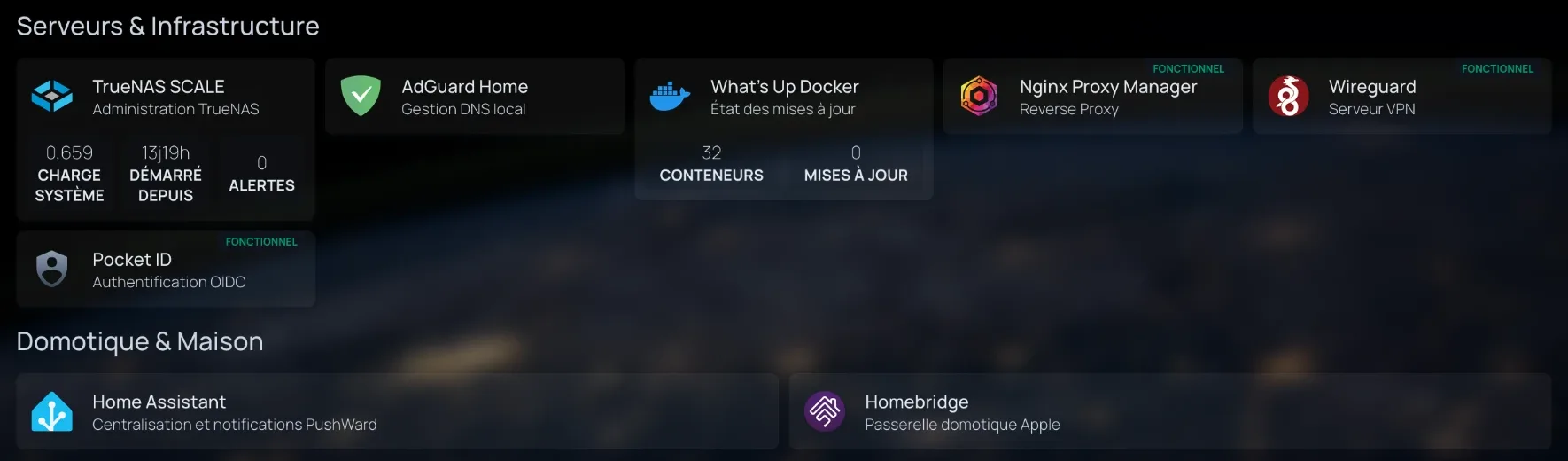
Excerpt from the homelab dashboard: TrueNAS SCALE (load, uptime, 0 alerts), AdGuard Home, What's Up Docker (32 containers, 0 updates), Nginx Proxy Manager, WireGuard, Pocket ID, Home Assistant and Homebridge. (enlarge image)
Excerpt from my dashboard (Homepage): TrueNAS server status, infrastructure and home automation services.

Security and operations

Who can reach what

  • Passwords, NAS, photos and home automation can only be reached locally or over the VPN.
  • Published services go through an HTTPS reverse proxy (Nginx Proxy Manager), with passkey single sign-on (Pocket-ID) for the ones that support it.
  • NFS shares are restricted to the VPN address of the only authorised machine.

How I monitor it

  • Netdata monitors the servers and sends critical alerts to Telegram.
  • Every Sunday, a ZFS scrub and a long SMART test check the disks.
  • New container versions are detected automatically.
  • An n8n workflow sends me urgent alerts and replies to this site's contact form by text message (Free Mobile API).

Two problems, from failure to fix

A “successful” call that was actually going through the VPN

I wanted messaging “like iMessage” (photos, videos, voice messages), with group calls for 4 or 5 people, for fewer than ten people close to me and with 4 to 5 GB of RAM available on the NAS. I compared Matrix with five other solutions, then deployed Synapse, PostgreSQL and LiveKit with Docker Compose on the TrueNAS, with one ZFS dataset per component.

First pitfall: my “successful” test call was actually going through the VPN, as the LiveKit logs showed. I made it again over 4G, with the VPN and Wi-Fi off, to check that the public path really worked.

On the security side, federation and sign-ups are closed, and the admin API is blocked from the Internet. I replaced the web admin interface with the command line over SSH: one fewer service and one fewer exposed port. Before moving authentication to MAS (OIDC), I took a ZFS snapshot and a database backup: 10 checks out of 10 passed, with accounts and messages kept.

Result: end-to-end encrypted video calls, using less than 300 MB of RAM during a call. Still open: audio doesn't get through between two phones outside the local network, and a packet capture is planned.

My takeaway: a test that works proves nothing until you've checked which way the traffic goes.

The network card that kept failing during transcoding

I gave the mini PC's GPU to the media VM (passthrough) for transcoding. As soon as transcoding ran continuously, the Intel network card froze and the machine became unreachable.

I first disabled PCIe power management (ASPM) and added a script, run every minute by cron, that restarted the interface when it froze. It kicked in three times in under an hour: each time, the network came back, then went down again 20 to 25 minutes later.

I then checked that the card and the GPU were in different IOMMU groups, pinned their interrupts to two separate cores (a systemd service) and turned off Energy Efficient Ethernet on the card.

Result: a full night of transcoding without a freeze.

Caveat: I pinned the interrupts and disabled Energy Efficient Ethernet at the same time, so I don't know which of the two fixed the problem.

Next steps

  • An off-site copy of my own data: syncing to cloud storage currently fails because of a quota limit.
  • Scheduled backups of the Matrix database.
  • Audio on calls between phones outside the local network.
  • Security monitoring: log collection and intrusion detection.

Skills involved

Back to projects